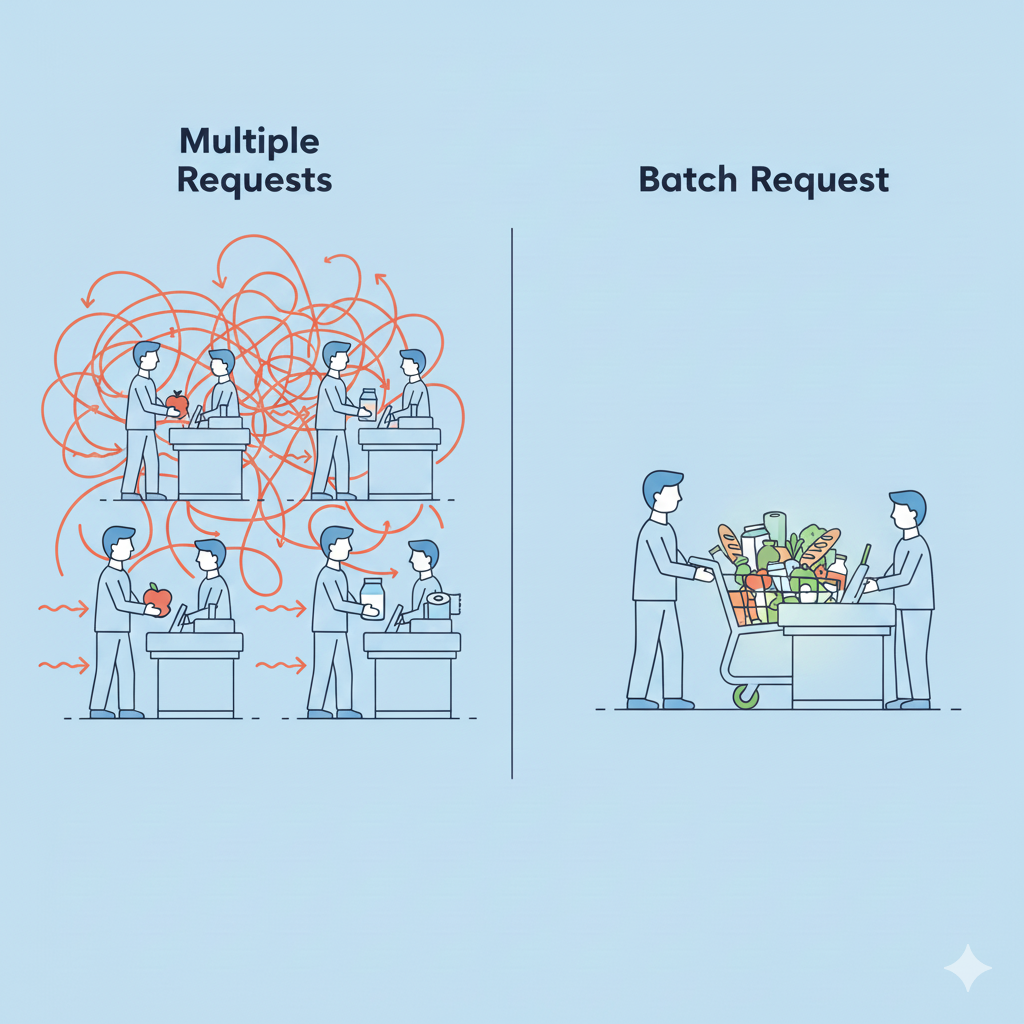
Batch APIs are one of those engineering patterns that look deceptively simple on paper:
“Instead of calling your Service 50 times, just call it once.”
If only it were that easy.
Anyone who has worked on production systems knows the complexity doesn’t appear on day one. It shows up when you make the system production-ready:
When you introduce caching, connection pools, SLAs, and downstream constraints. That’s when batch APIs start to reveal their sharp edges.
This article walks through how to design batch APIs that actually hold up in real-world distributed systems. We’ll use an Identity Service as an example throughout (e.g., fetching user profiles, validating permissions, checking account status).
Why Batch APIs Matter
Reducing Round Trips
Imagine a client trying to validate 50 user IDs against your Identity Service:
GET /identity/users/{id}
Calling that endpoint 50 times means:
- 50 HTTP connections (or reused connections but still 40 requests)
- 50 authentication checks
- 50 sets of request/response serialization
- 50 traces
- 50 log entries
Batching compresses all of that into one request:
POST /identity/users:batchGet
The latency difference can be dramatic — especially on mobile networks or high-latency regions.
Resource Efficiency at Scale
Batch APIs reduce:
- Connection pool exhaustion in services with high concurrency
- Load balancer pressure (fewer active connections)
- Database contention when executing multiple lookups inside a single SQL query
- Timeout cascades, because fewer requests means fewer simultaneous operations
We’ve seen batch endpoints reduce connection counts by 80–90% during peak load in production — enough to prevent cascading failures during traffic spikes.
The Hard Part: Partial Failures
The biggest challenge in a batch API is not fetching 40 users.
It’s dealing with what happens when some succeed and some fail.
For example, in an identity system, this is common:
- Some user IDs don’t exist
- Some accounts are deleted
- Some requests fail validation
- Some violate permissions
- Some are throttled by downstream systems
This is where batch API design becomes an art.
The Failure Spectrum
Failures come in many flavors:
- Complete failure — your Identity Service is down
- Partial failure — 37 users succeeded, 3 failed
- Per-item errors — validation, permissions, “not found,” etc.
- Timeout on slow items — e.g., a user whose profile requires a downstream OAuth lookup
A well-designed batch API makes this complexity obvious and manageable for the client.
Design Patterns for Partial Failures
Pattern 1: Per-Item Error Responses (Most Common)
This is the safest default for systems.
{
  "results": [
    {
      "id": "user-1",
      "status": "success",
      "data": { "userId": "user-1", "email": "alice@example.com" }
    },
    {
      "id": "user-2",
      "status": "error",
      "error": { "code": "NOT_FOUND", "message": "User not found" }
    }
  ]
}
Pros
- Clear mapping back to input
- Clients can process successful items immediately
- Works well for async retries
Cons
- Verbose
- Must preserve ordering or provide an explicit correlation ID
Pattern 2: Separate Success/Error Collections
Useful when dealing with entity maps.
{
  "success": {
    "user-1": { "email": "alice@example.com" }
  },
  "errors": {
    "user-2": { "code": "NOT_FOUND" }
  }
}
Clear separation. Great for server-to-server APIs.
Pattern 3: All-or-Nothing (Rare in Identity Systems)
This is used when atomicity is critical — rare for profile lookups, common for financial transactions.
{
  "error": "BATCH_FAILED",
  "details": [
    { "id": "user-2", "error": "PERMISSION_DENIED" }
  ]
}
The Non-Negotiables of Batch APIs
Handling partial failures is only one part of building batch APIs.
The rest comes down to defining a clear, predictable, client-safe contract.
These are the design decisions you must make explicit, otherwise clients will guess — and guess wrong.
Ordering in Batch APIs
Should the API preserve input order? This really depends on the use-case.
For example, in a Batch Fetch order does not matter where client requests product details for [P3, P1, P8]. These items are independent, so the service can return them in any order or as a map. In contrast to, in a Batch Operations order must be preserved where a client sends a batch of account balance updates to be performed on a an account.
+100-40+10
Applying them in sequence results in a final balance of +70.
Applying them out of order—say -40, then +100, then +10—still results in 70 in this case, but introduce overdraft checks:
- If step 2 (
-40) is applied first and the account has only $10, it fails. - Applied second (after
+100), it succeeds.
This means the meaning of the batch depends on the order.
Short Rule of Thumb for ordering.
- Batch reads: order doesn’t matter
(product lookups, profile lookups, permission checks) - Batch operations with dependent side effects: order does matter
(financial transactions, inventory adjustments, state transitions)
If the outcome changes when you reorder the items, the API must define ordering guarantees explicitly.
Enforcing Batch Size Limits
Never accept unbounded batches. Batch limits protect you from:
- Memory spikes
- Slow queries
- Unpredictable downstream behavior
- Clients accidentally (or maliciously) submitting 10K IDs
Identity systems typically use 50–200 item limits.
const MaxBatchSize = 100

func ValidateBatch(items []string) error {
    if len(items) > MaxBatchSize {
        return ErrBatchTooLarge
    }
    return nil
}
Correlating Each Item
Every item must have a correlation key — even if the client didn’t send one.
{
  "requests": [
    { "client_id": "req-1", "user_id": "123" },
    { "client_id": "req-2", "user_id": "456" }
  ]
}
This makes debugging and tracing significantly easier.
Timeout & Retry Semantics
Batch timeouts are tricky.
A lookups often hit:
- database to perform lookup
- Another external service to get some additional data about the entity
- Cache
You need:
- A global batch timeout
- Per-item cutoffs (don’t let one user block the batch)
- Partial responses when timeouts happen
A good contract looks like:
{
  "partial": true,
  "timeout_ms": 5000,
  "results": [...]
}
Clients can retry only failed items — much more efficient.
Conclusion
Batch APIs aren’t just “multiple requests in one call.”
They’re a contract for how your system handles partial failures and distributes work across downstream dependencies.
When designed well, batch APIs:
- Reduce load
- Improve latency
- Lower costs
- Increase resilience
- Dramatically simplify client logic
But the most important principle is this:
Design for partial failures from day one.
They will happen. And your clients will thank you for making them easy to handle.
Further Reading
- Google API Design Guide: Batch requests section